AI images in your site's own style: brand imagery, routing, candidates and edits
How image generation works on a Kugel Platform site: the site's brand imagery, the style override, usage-context routing, candidates, slots, edits, text checks and cost receipts, each shown with a real example.
17 min read By Platform Documentation Guide #Architecture #Publishing

Media
You write the subject; the site supplies the style
When an agent generates an image for an article, it describes only what the picture shows. The platform adds how the picture looks: the site's declared style sentence, its colour palette, its list of things to avoid, its aspect ratios and a fixed seed base. Two articles written months apart come out looking like one publication, and nobody repeats the house style in every request.
The same job also decides which image model is used, can return several candidates for a person to choose from, and hands back measurements and a cost receipt. Editing the result, for example cropping it, is a separate step and is usually model-free.
This article explains each part and shows it working. Every picture in it was generated or edited for this article through the tools an agent uses, and the checks and failures are reported as they came back on 15 October 2026. Anything that was not run is labelled as not verified.
The parts, in plain terms
Subject. The prompt of a generation job. On a site with a declared style it holds the subject only: what is in the picture. Style words in a subject are not needed and can fight the house style.
Brand imagery. The site's image style, stored on the site: a style sentence, a palette, a list of things to avoid, an aspect ratio for each use, a seed base and composition notes. It changes only through its own tools, never by editing the site by hand.
Style override. An optional
stylefield on one job that points it at a different visual standard or a one-off partial style. The response says which style won, instyleSource.Usage context. A label on the job, such as
article_body, that routes it to a model. An agent always sets it.Candidates. One job can produce 1 to 4 images at once with
candidateCount. Each is stored and measured. None is selected for you.Slot. A stable name such as
article_image_2, so an image can be found by name instead of by its fingerprint. A slot points at the latest image written to it.Edits. A new image made from an existing one: a deterministic transform (no model), a masked edit or an image variation (both use a model). The original always stays.
Checks. Read-only tools that measure an image or read the text in it. They warn and never block.
Receipt. A cost record attached to every job.
What the platform adds to your subject
On a site with a declared style, the platform assembles the full request on the server. In the generation record of this article's first job the order was: the site's style sentence, then the subject, then the palette, then the composition notes. The site's avoid list is merged with any negatives the agent sends. An agent can add to that list but cannot remove from it.
A seed is derived from the site's seed base, so a subject is repeatable. Candidates use consecutive seeds: the two in example 2 differ by one.
Some fields an agent sends are replaced on a branded site. A seed is replaced and the response names it under overriddenFields, so the agent learns not to send one. In example 1 a seed was sent on purpose and it came back listed. According to the tool contract a trained style add-on is replaced the same way; this was not tested.
The palette is translated from hex codes into plain colour names before the model sees it, because models paint hex codes into pictures as visible text. Every branded job therefore carries a warning that eight colour literals were rewritten. It is expected.
The order an agent follows
Make sure the article exists. Images belong to an article, or to another owner such as a page, and the article's id is the request id of every image made for it.
Read the site's style and routing: the brand imagery on the site object, and
get_image_model_policy.Search before generating. The overview article, linked at the end, covers the search step.
Call
create_agent_artifact_jobwith the subject only, a descriptive filename,requirements.image.usageContextset toarticle_body, an explicit size, a byte limit and a negative list that names text. AddcandidateCountfor a choice,slotfor one image that must be found by name, orstylefor a one-off look.Read the first response for
styleSource,overriddenFields,warningsand the cost estimate. Then pollget_agent_artifact_job_statusuntil the job is complete. A completed job returns the artifact, its public path andverified: true.Check the result with
check_image_textinexpect_nonemode, the measurement tools andverify_agent_artifact. Then look at the picture.If it needs cropping or resizing, use a deterministic tool such as
image_transform. The result is a new image and the original stays.Attach the public path, which starts with /img/, to the article, validate and publish. Publishing exports the article dark. A person releases it separately.
Example 1: a hero image, first attempt
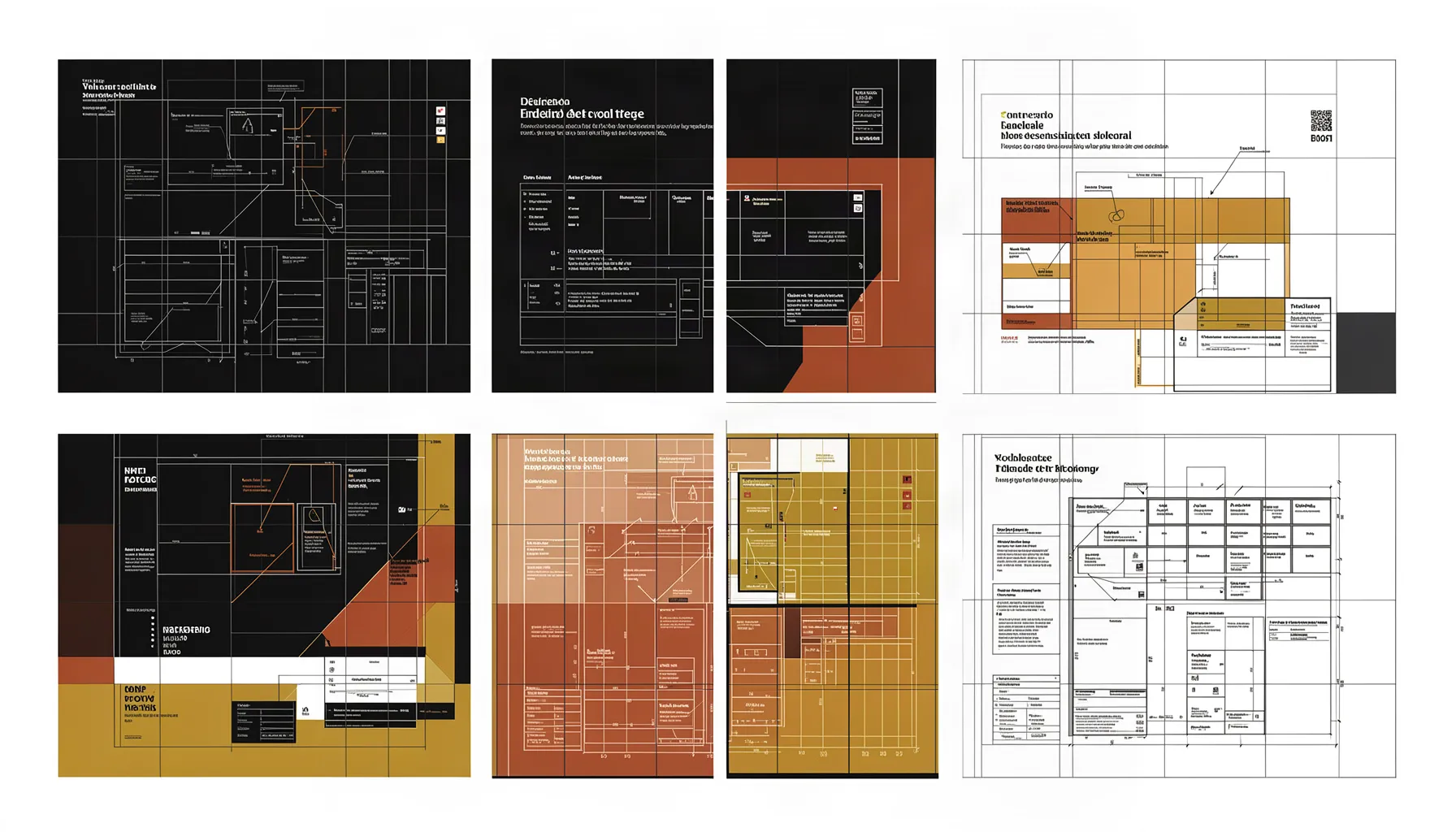
The subject was: four matching image proofs in a row on a modular grid, one lifted above the others, a crop frame over its corner. The job asked for the 1792 by 1024 size, the cheaper article_body routing and a webp file under the byte limit. It also carried a seed supplied by the caller, to see what the platform did with it.
The response showed styleSource site and listed seed under overriddenFields. The job finished in about ten seconds and returned a 109 KB image. The picture is not usable. The site's style sentence mentions schematic overlays and annotation zones, and the model answered with six interface-like layouts filled with fine print instead of four proofs in a row. None of the lettering spells anything.
The text check in example 4 flagged it. This is the failure the check exists for, and the reason every generated image is looked at before it goes into an article.
Example 2: two candidates, and how an editor picks
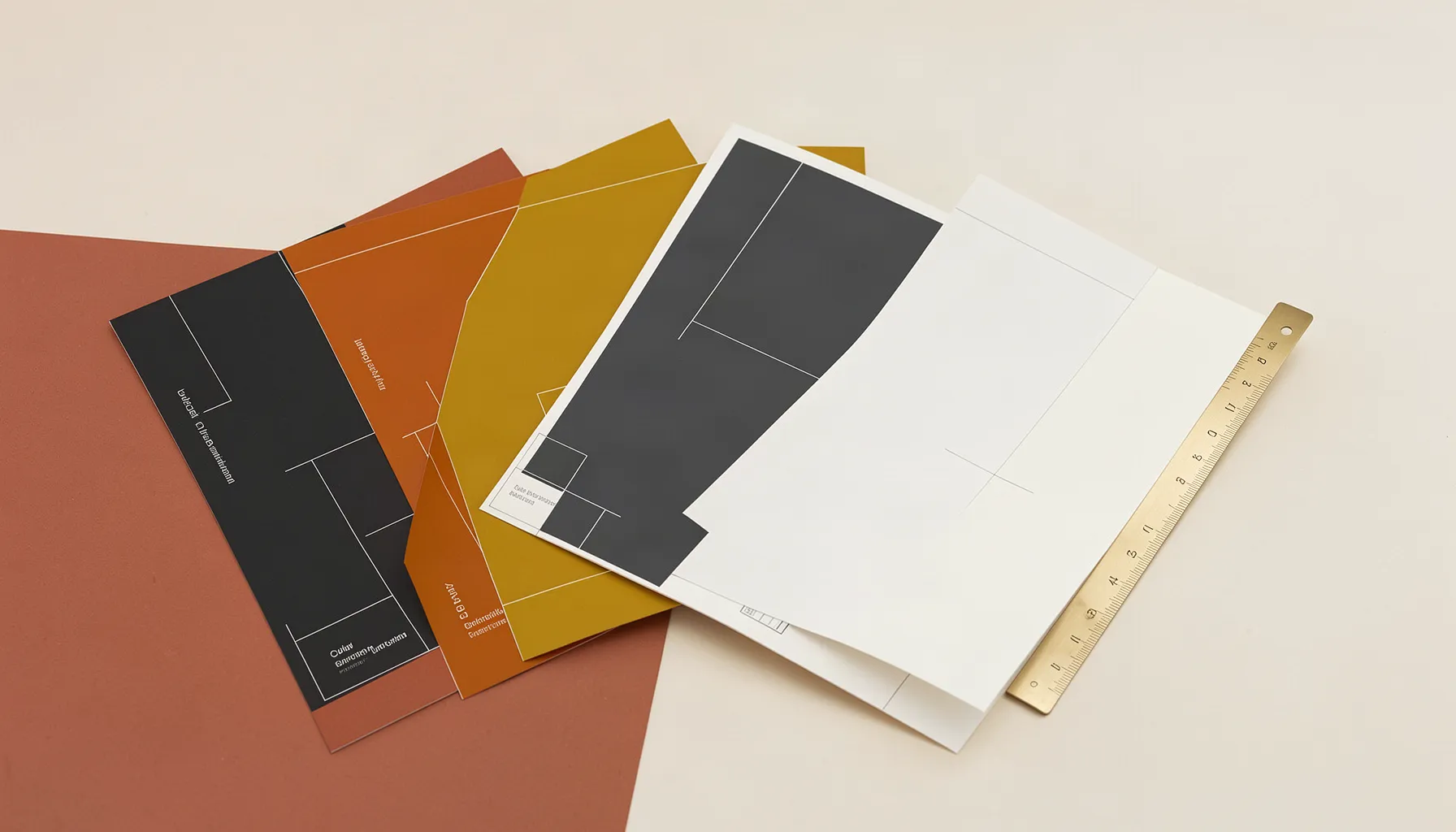
The second job used a physical subject: four blank colour swatch cards fanned across a worktable, one pulled forward, a brass ruler beside them, nothing written on any card. It set candidateCount to 2 and carried no slot, because a slot implies a choice and a candidate job cannot hold one. The negative list now also named interfaces, documents and diagrams.
The job took about eighteen seconds. It returned both images with objective measurements (size, aspect ratio, dominant colours), and its selection field read caller: the platform does not choose. The seeds were consecutive. Then an editor does what the tools cannot.
Measure. Both candidates passed the palette check against the site's eight colours (mean colour distance 9.8 for A and 7.0 for B, against a limit of 10) and the quality check for sharpness, clipping and noise. Numbers like these do not tell the two apart.
Read the text. The text check flagged two short fragments in each. A's reading found 6 words and B's found 16.
Look. B has small garbled lettering on three cards. A has a few illegible marks on the ruler and nothing else.
Pick. A became this article's hero image. B stays stored under the article, unused.
Example 3: a deterministic crop of the chosen image
The chosen candidate is wide. For a square slot, the crop below keeps the fanned cards and drops the ruler. It was made with image_transform: crop a rectangle of 800 by 800 pixels, then save as webp at quality 82. No model is called and no cost is incurred. The result is a new 25.7 KB image. The original is untouched, and the new image records which image it came from and the exact operations applied.
The first attempt ran the same job through create_agent_artifact_job with editMode set to deterministic_transform. It completed, reported verified, and returned an image the same size as the source: a re-encode with no crop. That job call has no field for crop instructions, and the instructions placed inside requirements were ignored without a warning. For crops, use image_transform or smart_crop.

Example 4: the text check on generated images
check_image_text reads the text in an image. In expect_none mode it flags any significant text, which is how you catch lettering a model painted into the picture. It always returns a successful call. The verdict sits in textCheck.ok, and it never blocks anything. Results from this article's images:
First attempt: 50 fragments detected, the first 20 listed, including long non-words such as "desemshickcen". Reject.
Candidate A (chosen): 2 short fragments, 6 words read. Accept after looking.
Candidate B: 2 short fragments, 16 words read, and garbled lettering visible to the eye. Reject.
Style-override image (example 5): nothing detected, ok true.
Square crop: 1 short fragment ("PA"). A crop is a separate image, so it gets its own check.
Read the list and the word count, not only ok. The value is false whenever anything at all is found, including a two-letter misreading of a straight line. A pass means no obvious text. Faint or tiny lettering can be missed, so the check does not replace looking at the picture.
Example 5: a one-off style with the style override
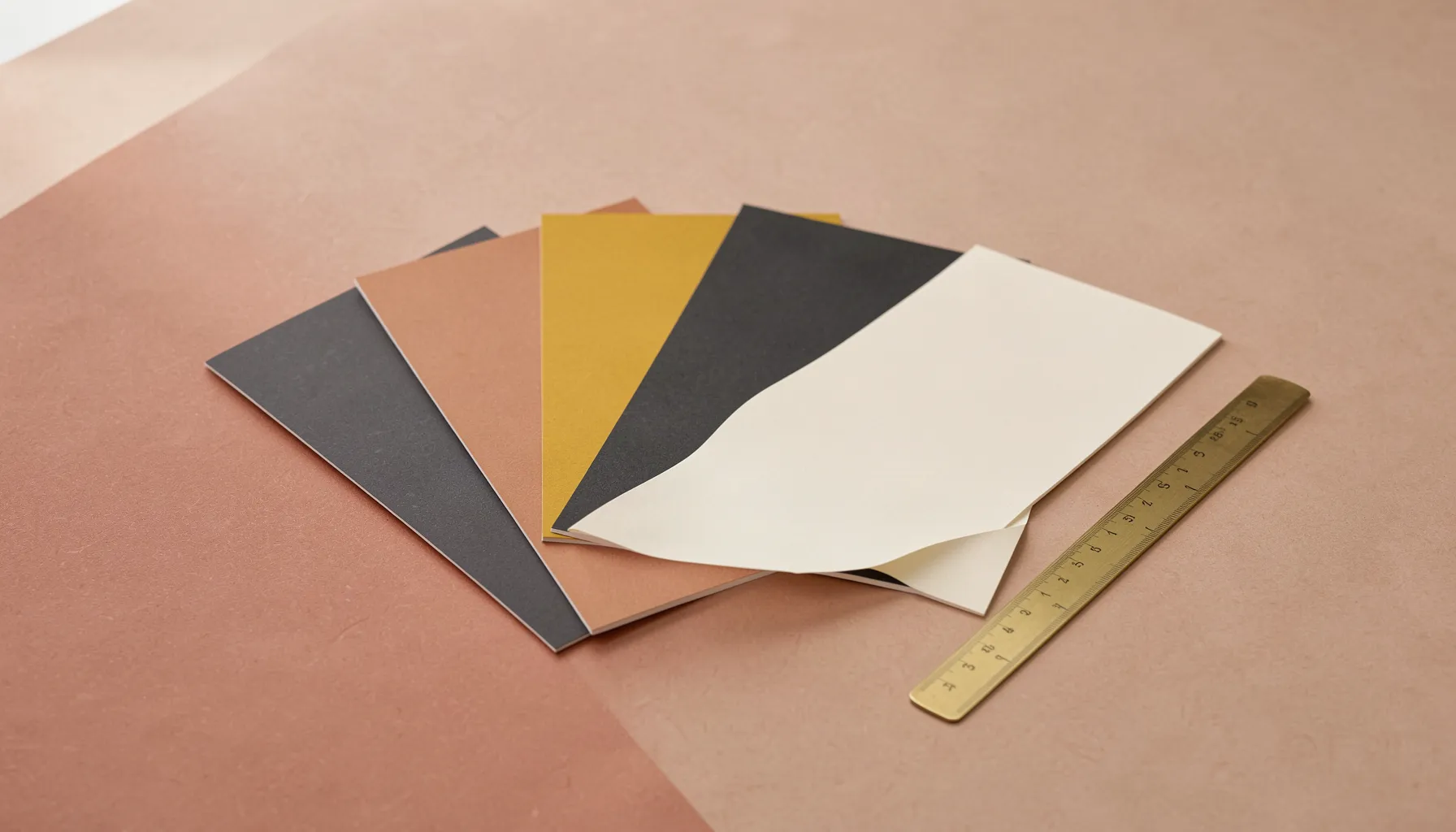
The fourth job repeated example 2's subject with a style override: a quieter style sentence (soft daylight, matte paper, a calm composition) and quieter composition notes. The response reported styleSource override and echoed the override back. The palette still came from the site, which the recorded prompt shows. The seed was derived again, and the picture came back as a photographic still life instead of a digital illustration. The text check found nothing.
The model drew five cards, not four. A count in a subject is a hint, not an instruction, so check counts and arrangements by eye.
Use an override for a single image that should look different, such as a page that needs a calmer picture. For a look that should apply everywhere, change the site's brand imagery instead, as described below.
Edits: three kinds, and which ones cost money
Deterministic transform. Crop, resize, rotate, extend, tint, blur, border and format change, applied in order. No model and no cost. Tools: image_transform, smart_crop (a content-aware crop to one or more aspect ratios), make_variants (responsive widths), split_image and compose_layout. Example 3 used image_transform. The others were not run for this article.
Masked edit. The model repaints only the area inside a mask image you supply. The job call uses
operation: edit,editMode: masked_edit, asourceArtifact(the artifact reference and its sha256), amaskRefand optionaleditInstructions(what to change, what to keep, what to avoid). In the policy read on 15 October it routes to a dedicated fill model whose capability evidence is marked EXTERNAL-UNVERIFIED. It is a paid call.Image variation. The model produces a variation of the whole image and is routed to a dedicated edit model. It uses the same call with
editMode: image_variation. It is a paid call.
Masked edits and variations were not run: this article's allowance of four generated images went to generation. The two descriptions above come from the tool contract and the live routing policy. The contract also says the job re-checks the source's sha256 before editing, so an edit cannot run against different bytes than the ones you looked at. As with any edit, a model is needed only when new pixels have to be invented.
Changing the house style: brand_imagery_propose, explained and not run
brand_imagery_propose drafts a new image style from a mood board of up to eight reference images (each with an optional crop region, note and weight), from a written brief, or from both. It forwards the request to a separate vision-capable writing step and returns a proposal: the style, a rationale, sample subjects, a confidence figure and a complete visual standard body. It writes nothing, neither to the site nor to a visual standard.
Applying a proposal is a separate, deliberate step. Create a visual standard from the returned body, then apply it to the site with site_apply_brand_imagery. The site's brand imagery is not edited by hand. Neither tool was called for this article, and this article does not change the site's style.
Settings and limits, as read on 15 October 2026
Model routing. The image model policy sends
article_header,article_bodyandcategory_pageto the same fast, low-cost generation model today. The split between a cheaper and a stronger model exists in the mechanism but not in this site's current settings. A model named on a job overrides the policy. Read it withget_image_model_policy. An owner changes it withset_image_model_policy.Edit routing. Variation and masked edit each have their own model, listed in the same policy.
Unknown or missing context. Per the tool contract an unrecognised context is treated as article_body with a warning, and a job with no context goes to the most expensive available model. Neither was tested, so both are unverified as of 15 October 2026. Always set the context.
Sizes. Five only: 1024 by 1024, 1024 by 1792, 1792 by 1024, 1536 by 1024 and 1024 by 1536. The site's aspect ratios (4:3 for article bodies, 16:9 for headers) choose the nearest size when none is given. The size was always set explicitly in the tests, so that is untested.
Candidates. 1 to 4 per job, each charged separately, and not combinable with a slot.
File size. 150 KB (153,600 bytes) per image, webp preferred. The four generated images here were 49 to 109 KB. Pass
maxBytes. The content contract flags a known discrepancy dated 6 August 2026: it says an over-budget image warns, while the service has been refusing them. Not re-tested on 15 October 2026.Image operations. Up to 32 operations per call, output up to 8,192 pixels on a side, up to 8 variants per smart-crop call.
Measurements. Sharpness, clipping and noise thresholds come from the image analysis policy (
get_image_analysis_policy,set_image_analysis_policy). The palette check defaults to a mean colour distance of 10 and a single-colour limit of 20.Style override. Open on 15 October, since the override in example 5 was applied. An owner can lock it in the site's guardrail settings. A locked site ignores the field and reports site_locked. The locked case was not tested.
Writes. 60 per 10 minutes per member. While several agents wrote under one member, writes were refused twice; each refusal named how long to wait.
Receipts and the spend ledger
Every job carries a receipt. For a generation it names the provider and model, the basis (per megapixel), an estimate in US dollars flagged as an estimate, the date of the price table it used (20 July 2026), the units, and whose provider account was charged. At the 1792 by 1024 size the estimate was about one US cent per image. For a deterministic edit the receipt shows zero and is not flagged as an estimate.
The figure on a job is a price-table estimate, not an invoice. The project also keeps a monthly spend ledger of every priced provider call, with totals by provider and kind and a monthly cap that either warns or blocks. The ledger could not be read: its reader is not part of this site's connector, so the ledger is unverified here.
One caution. On the two-candidate job the estimate counted two images and the receipt counted one, so a per-job receipt may understate the cost of a multi-candidate job.
Warnings you will see, and what to do
agents_sdk_turn_failed. This means an orchestration step was skipped and the provider call ran directly instead. The image is still produced. Token usage for that step is not receipted, so recorded spend may be understated. To resolve it, tell the site owner or operator, who checks the provider key and its credits. Retrying the job does not help.
PROMPT_COLOR_LITERALS_REWRITTEN. Expected on a branded site. No action.
usageContext_missing. Appeared on an edit job that left out the context. Harmless for a model-free edit. On a generation, always set the context.
overriddenFields. Fields the site replaced. Stop sending them.
A text-check hit. Read the list. Regenerate with a more physical subject, or put the words in with annotate_image, which is deterministic. Do not publish lettering a model invented.
A write-rate refusal. Wait the time it names and retry the same write with the same idempotency key.
A refused filename. The tool contract names FILENAME_TOO_GENERIC and FILENAME_INVALID. Use a name taken from the subject. Neither was triggered.
A slot is not a choice. A slot points at the latest image written to it. This article's hero slot still points at the rejected first attempt, because the chosen image came from a candidate job, which cannot hold a slot. Attach images by their /img/ path, not by slot name.
Negatives may not reach the model. On the routed model the recorded request has no separate negative-prompt field, and the recorded prompt does not include the avoid list. It could not be confirmed that the avoid list reaches the model. Rely on the text check, not on negatives.
Not verified in this run
These behaviours are described by tool contracts or policy and were not exercised for this article.
Masked edit and image variation.
What a generation with no usage context routes to, and the coercion of an unknown one.
The annotate option on a generation, which adds a no-text instruction and regenerates once if text leaks. The regeneration would be a second paid call.
A refusal for candidateCount combined with a slot.
Reading the project spend ledger and its cap.
The size chosen when none is given.
Whether the avoid list reaches the model.
A locked style override.
brand_imagery_propose, which was not called.
How this article's images were made
Four images were generated for this article, all with the article_body routing: one in example 1, two in example 2 and one in example 5. Every other picture is a crop of one of them. The two probe edit jobs in example 3 cost nothing. A limit of four generated images was set for this article and was met.
Every generated image was fetched and looked at before it was used, and the one that came back unusable is shown as such.
Related reading
Other articles in this series on images and PDFs:
Download any article as a PDF: templates, kinds and the quality check
Labels, arrows and callouts on images: annotating without a designer
One image, every screen: resizing, smart crops, splits and layouts
Checking images against the brand: colour, contrast, sharpness and logo placement
Editing PDFs without a designer: page numbers, watermarks, merging, text and forms
Finding and importing stock images: search, shortlist, licence and attribution